> ## Documentation Index
> Fetch the complete documentation index at: https://honeydew.ai/docs/llms.txt
> Use this file to discover all available pages before exploring further.
# AI Workflow
## Workflow
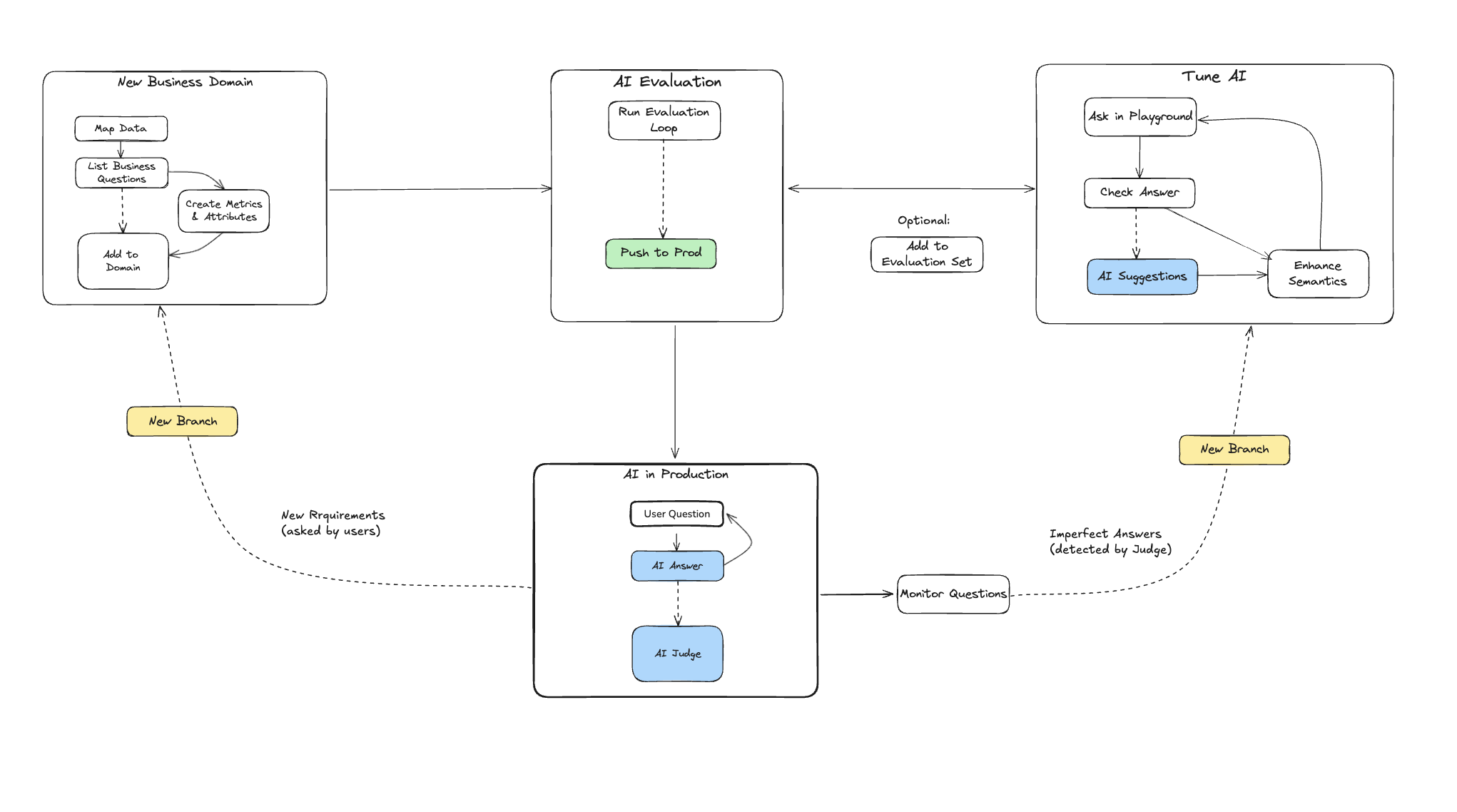
The workflow for Honeydew AI helps data teams ensure the stability and improve the quality of AI responses, in view of user demands.
Data teams using Honeydew to build production-grade AI systems typically follow three key approaches:
1. **[Metadata](/docs/integration/context-layer/ai-metadata)**: Define AI-specific metadata
to clarify intent and resolve ambiguities or inconsistencies in data.
2. **Evaluation**: Regularly validate AI outputs by testing them against a curated set of reference questions.
3. **Monitoring**: Continuously track new AI responses to gauge overall quality and identify specific modeling issues.
 ### Agents
Honeydew AI operates through [agents](/docs/integration/context-layer/agents),
within a workspace and a branch.
You can create multiple agents within the same workspace, each
targeting different analytical needs or user groups.
### Setting up a new business domain
Setting up any new business domain will include:
1. Set up **Semantic Layer Definitions**: Map data sources to a semantic layer;
create relevant [metrics](/docs/calculations/metrics) or
[entities](/docs/modeling/entities).
2. Create **[Context](/docs/integration/context-layer/context-management)**:
Organizational knowledge, analytical skills, and historical events
that guide the AI.
3. Create an **[Agent](/docs/integration/context-layer/agents)**:
Define which domain and context items the AI can access.
4. Create **[AI Metadata](/docs/integration/context-layer/ai-metadata)**:
Field-level descriptions, synonyms, and hints.
5. Test **Business Questions**: A set of business questions to evaluate the AI Analyst.
You can use the AI modeling helper at every step:
1. Use it to suggest required metrics or attributes given a question.
2. Ask it about places where additional metadata can be useful, or where metadata is ambiguous.
3. Check its judging response on tested business questions.
### Maintaining an active business domain
The more frequently a domain is used, the more critical it becomes to actively monitor its quality and refine the semantic layer as necessary.
Activities on an active domain will include:
1. Monitor **AI Responses** to improve the semantic model when there are gaps.
2. Add **New Business Questions** to the evaluation set to cover new business demands.
3. Keep testing **Known Business Questions** as things change to avoid regression.
### Agents
Honeydew AI operates through [agents](/docs/integration/context-layer/agents),
within a workspace and a branch.
You can create multiple agents within the same workspace, each
targeting different analytical needs or user groups.
### Setting up a new business domain
Setting up any new business domain will include:
1. Set up **Semantic Layer Definitions**: Map data sources to a semantic layer;
create relevant [metrics](/docs/calculations/metrics) or
[entities](/docs/modeling/entities).
2. Create **[Context](/docs/integration/context-layer/context-management)**:
Organizational knowledge, analytical skills, and historical events
that guide the AI.
3. Create an **[Agent](/docs/integration/context-layer/agents)**:
Define which domain and context items the AI can access.
4. Create **[AI Metadata](/docs/integration/context-layer/ai-metadata)**:
Field-level descriptions, synonyms, and hints.
5. Test **Business Questions**: A set of business questions to evaluate the AI Analyst.
You can use the AI modeling helper at every step:
1. Use it to suggest required metrics or attributes given a question.
2. Ask it about places where additional metadata can be useful, or where metadata is ambiguous.
3. Check its judging response on tested business questions.
### Maintaining an active business domain
The more frequently a domain is used, the more critical it becomes to actively monitor its quality and refine the semantic layer as necessary.
Activities on an active domain will include:
1. Monitor **AI Responses** to improve the semantic model when there are gaps.
2. Add **New Business Questions** to the evaluation set to cover new business demands.
3. Keep testing **Known Business Questions** as things change to avoid regression.