> ## Documentation Index
> Fetch the complete documentation index at: https://honeydew.ai/docs/llms.txt
> Use this file to discover all available pages before exploring further.
# dbt
Honeydew dbt integration allows to materialize Honeydew-managed datasets via dbt.
## Usage
Given a [dynamic dataset](/dynamic-datasets) named `my_dataset_name` create a dbt model called `my_dataset_name.sql`.
Put the following in the model code:
```sql theme={null}
-- Optional: Set up various materialization parameters
{{ config(materialized='table') }}
-- Set up any additional dependencies in dbt with
-- depends_on: {{ ref('upstream_parent_model') }}
-- Dynamic dataset materialization
{{ honeydew.get_dataset_sql('my_dataset_name') }}
```
This model is now based on semantics defined in Honeydew.
## Honeydew dbt Package
Honeydew provides a [dbt package](https://github.com/honeydew-ai/honeydew-dbt.git) to integrate Honeydew with dbt.
### High-Level Flow
dbt connects to Honeydew via a *Snowflake* connection and uses the [Honeydew Snowflake Native Application](/integration/snowflake-native-app) to communicate with Honeydew.
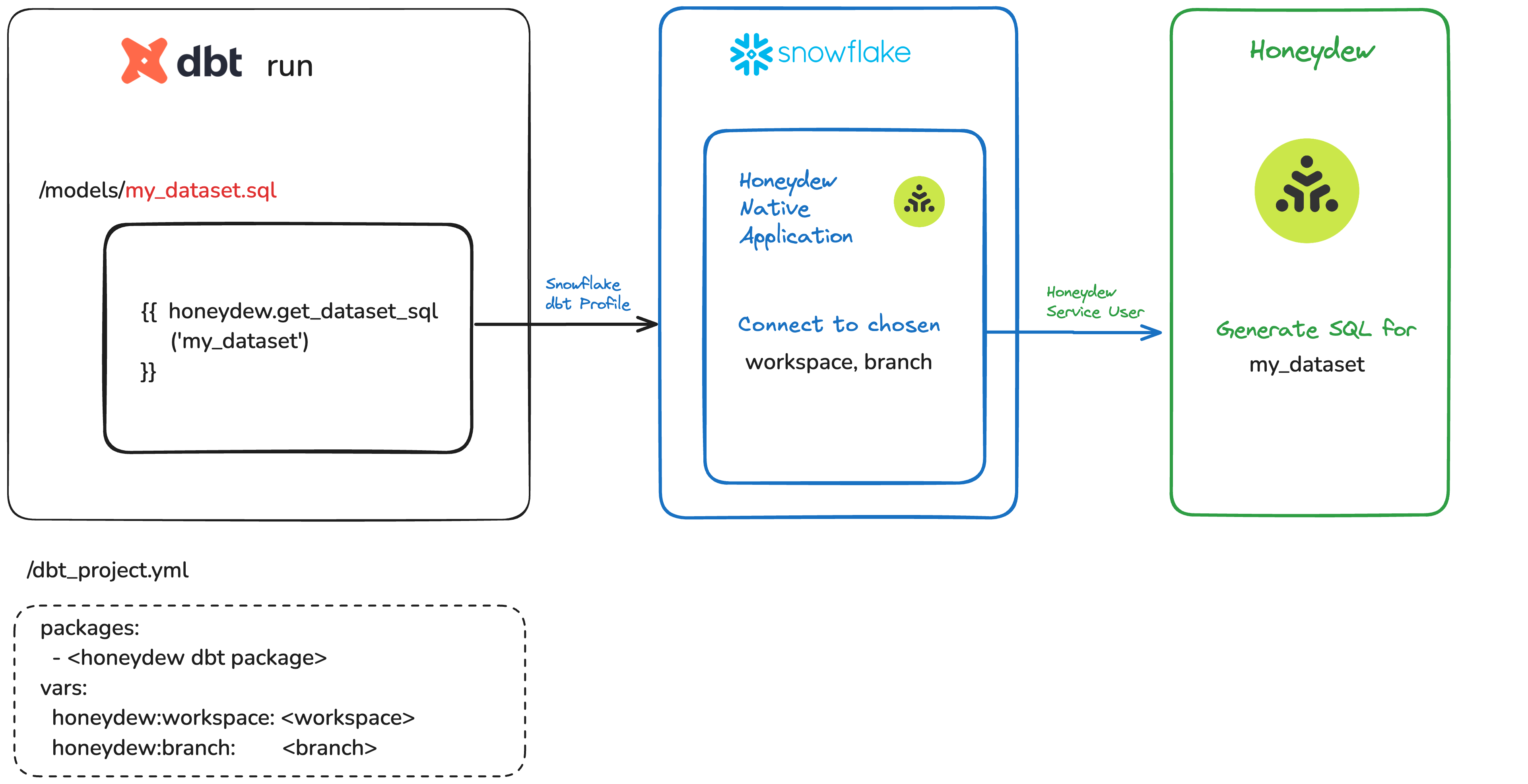 In each run of a dbt model based on Honeydew:
1. dbt connects to Snowflake with the current profile.
2. Within a dbt model, the Honeydew dbt macro initiates a Snowflake call to Honeydew API.
The macro uses the workspace and branch based on the Honeydew variable values set up in the dbt project
3. The Honeydew API client in Snowflake communicates with Honeydew to receive the correct compiled SQL for that branch.
The Snowflake user and role set up in the dbt profile will be used to access Honeydew.
Make sure that the role you use for dbt has access to the Honeydew native application.
In each run of a dbt model based on Honeydew:
1. dbt connects to Snowflake with the current profile.
2. Within a dbt model, the Honeydew dbt macro initiates a Snowflake call to Honeydew API.
The macro uses the workspace and branch based on the Honeydew variable values set up in the dbt project
3. The Honeydew API client in Snowflake communicates with Honeydew to receive the correct compiled SQL for that branch.
The Snowflake user and role set up in the dbt profile will be used to access Honeydew.
Make sure that the role you use for dbt has access to the Honeydew native application.
A role can be added with
```sql theme={null}
GRANT APPLICATION ROLE SEMANTIC_LAYER.HONEYDEW_APP_PUBLIC TO ROLE DBT_USER_ROLE;
```
See [installation guide](/integration/snowflake-native-app#installation) for more details.
4. The compiled result of the macro call is the SQL for a Honeydew-based dbt model.
The compiled SQL for a model based on Honeydew is generated for each dbt run, keeping it up to date with the semantic model definitions.
### Installation
Honeydew runs in dbt projects connected to Snowflake. To interact with Honeydew, dbt can call the Honeydew Native Application.
Install the Honeydew dbt package by adding to `packages.yml` of your dbt project:
```yml theme={null}
packages:
- git: "https://github.com/honeydew-ai/honeydew-dbt.git"
revision: "latest"
```
Run `dbt deps` to apply.
Set the following [variables](https://docs.getdbt.com/docs/using-variables) in the dbt project configuration (`dbt_project.yml`):
| Name | Meaning |
| ------------------------------------- | ------------------------------------------------------------ |
| honeydew:workspace | Workspace in which to operate. |
| honeydew:branch | Branch in which to operate. Default=prod |
| honeydew:snowflake\_native\_app\_name | Snowflake native app installed name. Default=SEMANTIC\_LAYER |
An example `dbt_project.yml` configuration:
```yml theme={null}
vars:
"honeydew:workspace": "tpch_demo"
"honeydew:branch": "prod"
"honeydew:snowflake_native_app_name": "SEMANTIC_LAYER"
```
Here is an [example repository](https://github.com/honeydew-ai/dbt-integration-example) for dbt integration with Honeydew.
### Testing the integration
Communication details between dbt and Honeydew can be tested with the following call:
```sh theme={null}
dbt -d run-operation honeydew.get_dataset_sql --args "{'dataset_name':'my_dataset_name'}" --profile snowflake
```
That call will provide the details of the operation done by Honeydew. Replace the `snowflake` profile with your dbt profile and `my_dataset_name` with the dataset name to test.
### Extending the integration
Any Honeydew [API operation](/integration/snowflake-native-app) can be added in the following way:
```sql theme={null}
{{ honeydew.snowflake_native_app_call(, var('honeydew:workspace'), var('honeydew:branch'), , ...) }}`
```
## Metadata Sync
dbt Metadata Sync is coming soon.
Honeydew dbt metadata sync will support syncing with dbt the following metadata:
* Source dbt model references (when source dbt model is set for entities)
* Column descriptions
* Labels (as tags)
* General purpose metadata (if set)
## Honeydew and different dbt offerings
### dbt Core
Honeydew provides a [dbt package](https://github.com/honeydew-ai/honeydew-dbt.git)
that integrates with dbt. Using that package, Honeydew can manage dbt models in dbt Core.
Running dbt is based on an external orchestrator such as Airflow.
### dbt Cloud
Works with Honeydew in the same way as dbt Core.
There is no need for an external orchestrator. Additional integration is available to link dbt documentation built on a dbt Cloud job and the Honeydew UI .
### dbt Semantic Layer
There is no necessity to use the dbt Semantic Layer when using Honeydew. Honeydew metrics can connect to any BI tool directly.
Both can be used in parallel.
There are a number of core differences, such as:
1. **Composable complex metrics**: Honeydew enables a high degree of metric composition, including applying filters, partial aggregations, fan-out joins, multi-hop joins, multiple aggregation steps, time-based logic, and more.
2. **Context-aware metrics**: Honeydew metrics can adjust the user grouping, for example for dynamic ratios or dynamic nested aggregation.
3. **Reuse metrics in data marts**: Honeydew metrics can be directly used to build columns in other tables.
4. **BI connectivity and Metadata Sync**: Honeydew has standard SQL and metadata integrations that support a live connection with most major BI tools.
5. **Security Model**: Honeydew is designed around a user-based security model supporting row-level security and SSO.
6. **Performance**: Honeydew has a number of semantic-aware performance optimization such as aggregate awareness.
## FAQ
Honeydew enables complex modeling using a number of advanced modeling techniques:
1. Virtual [entities](/modeling/entities) for a derived level of granularity
2. Modeling a many-to-many [relation](/modeling/relations) through a connecting entity
3. Basing entities on top of SQL queries or Views in Snowflake
While these are possible with bespoke SQL code, building those in Honeydew provides a higher level of abstraction for the data model, and allows incremental expansion of the data model, without duplicating code and logic.
Honeydew provides a full component-level lineage within the Honeydew platform, as well as dbt lineage integration.
Honeydew does not produce dbt Semantic Layer models. The reason is that the dbt Semantic Layer models are more limited and do not support all the semantics that Honeydew supports.
Honeydew has internal automated tools for migrating logic from dbt to Honeydew. Honeydew team is happy to assist customers with this initial migration. This can be an iterative process - choosing one analytical domain at a time, and then re-modeling the logic kept in dbt models into Honeydew. The usual ratio between dbt models and Honeydew entities is 3:1, so at the end of this process there would be much less entities to maintain.