> ## Documentation Index
> Fetch the complete documentation index at: https://honeydew.ai/docs/llms.txt
> Use this file to discover all available pages before exploring further.
# Bitbucket
You can onboard using your own Bitbucket repository.
If you would like to use your own Bitbucket repository, please complete the following steps:
Create a new **Bitbucket** private repository using one of these options:
* Create a new repository
* Clone from the [Honeydew quick-start](https://bitbucket.org/honeydew-ai/honeydew-quickstart) example.
If you are restricting access to your Bitbucket workspace using IP addresses allow list,
add the IP addresses displayed in the Bitbucket connection screen in [Honeydew App settings page](https://app.honeydew.cloud/settings)
to the "IP Allow List" of your Bitbucket workspace.
For the Honeydew Cloud deployment, the following IP addresses are used:
* `34.86.209.90`
* `34.145.147.92`
If you are using a private Honeydew deployment, the IP addresses will be different.
You can find them in the Bitbucket connection screen in [Honeydew App settings page](https://app.honeydew.cloud/settings).
Please reach out to [support@honeydew.ai](mailto:support@honeydew.ai) and send the full repository name - `org-name/repository-name` (e.g. `honeydew-ai/honeydew-quickstart`).
Create a new **Bitbucket** repository token for Honeydew integration:
* In **Bitbucket**, under the repository you have created for Honeydew, go to **Repository settings** -> **Access tokens**
* Create a new Repository access token. Set the `Write` permission under `Pull requests`:
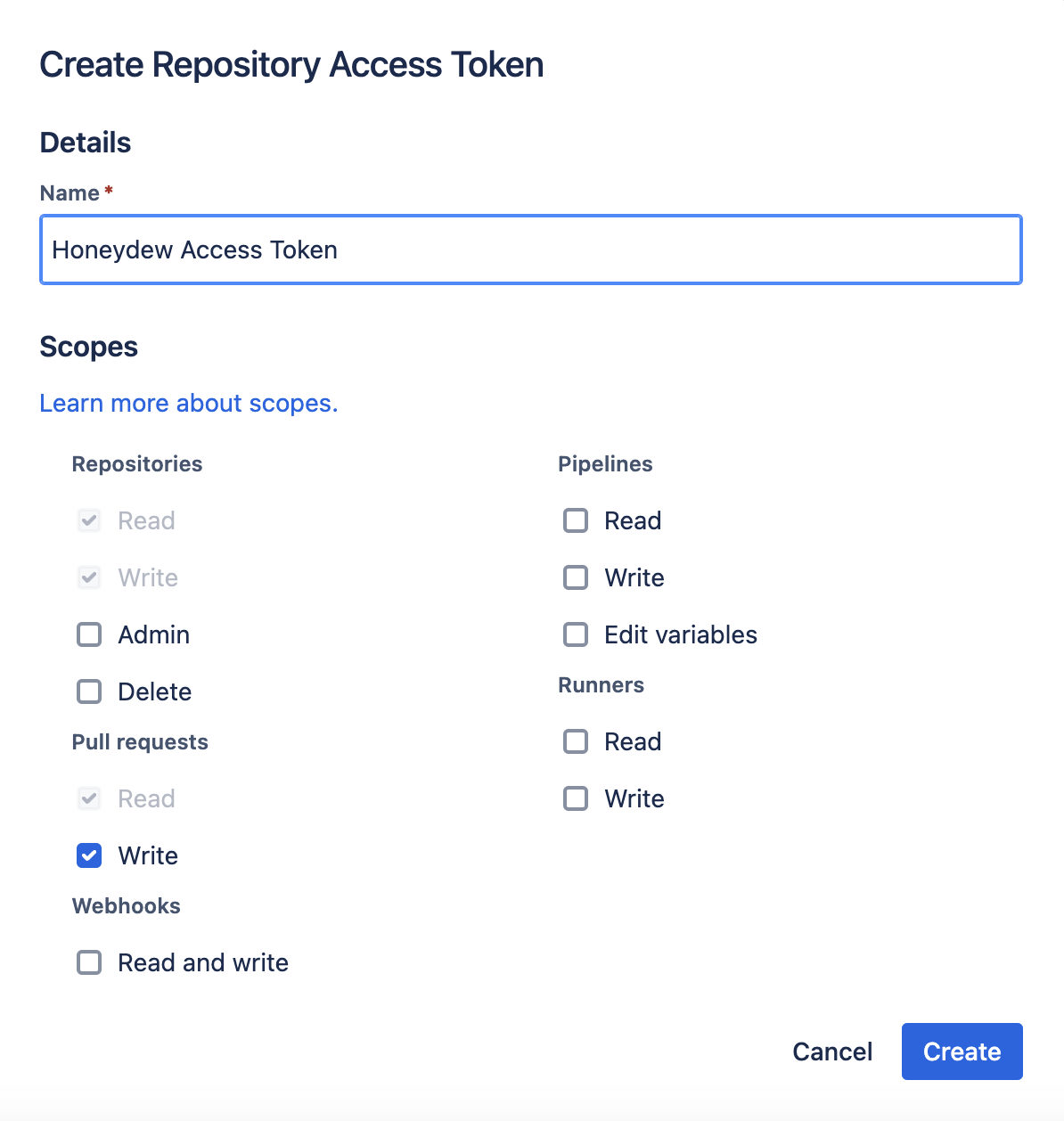 In the Honeydew application, go to **Settings** -> **Bitbucket** and configure the token.
If you have branch restrictions for new repositories, you may need to relax these rules for the Honeydew Bitbucket repository.
Specifically, please disable Merge checks requiring minimal number of approvals.
To validate semantic-layer changes in your CI/CD pipeline, see the
[CI/CD Overview](/docs/governance/ci-cd/overview).
In the Honeydew application, go to **Settings** -> **Bitbucket** and configure the token.
If you have branch restrictions for new repositories, you may need to relax these rules for the Honeydew Bitbucket repository.
Specifically, please disable Merge checks requiring minimal number of approvals.
To validate semantic-layer changes in your CI/CD pipeline, see the
[CI/CD Overview](/docs/governance/ci-cd/overview).