> ## Documentation Index
> Fetch the complete documentation index at: https://honeydew.ai/docs/llms.txt
> Use this file to discover all available pages before exploring further.
# Relations
## Introduction to relations
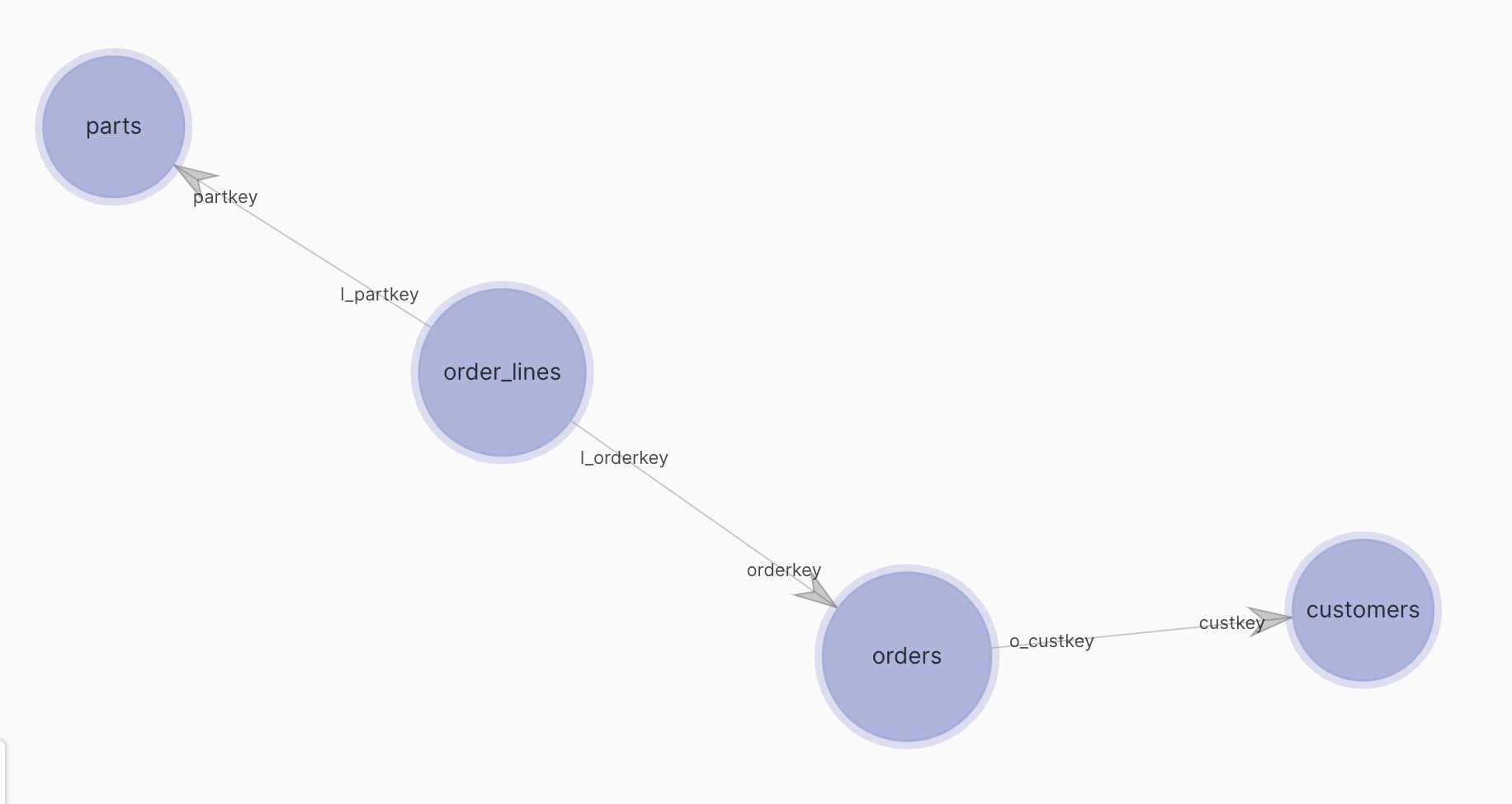
Usually, there is more than one entity in data. For example, TPC-H example has few “natural” entities in the data: *customers*, *orders*, *line items of an order* and *parts in a line item*.
Relations have directions - a customer may have many orders. Each order may have many line items.
A **Relation** in Honeydew connects entities. It can be a 1:1 or a 1:many relationship.
The “1” side of a relationship always goes to a Granularity Key of an entity.
For example, `orders` and `customers` are connected: `custkey` of `orders` to `custkey` of `customers`. `custkey` is the granularity key of `customers`.
Once there is a relationship defined, you can look at data together. For example, you may want to see all the orders of a customer. Honeydew will know how to connect the two.
Relationships control:
* How JOINs are performed between entities
* How filters on entities affect other entities
* How aggregations are performed across entities
Honeydew engine assumes that data fits the relations configuration:
* 1:1 relations are unique on both sides
* 1:many relations are unique on one side
It is a good practice to test the relationship 1 side column(s) for uniqueness during data preparation.
## Join Properties
### Join Type
Following types are supported:
* Inner
* Left
* Right
* Full Outer
By default, if not configured otherwise, Honeydew connects entities via LEFT join between many side
(for example a fact table) and the 1 side (for example a dimension table)
### Direction
Relationships typically convert to JOINs when are used to compute semantics.
The direction (1:many) affects how calculations are performed after the join, by telling the engine which rows are duplicated.
See [mixing granularities](/advanced-modeling/mixing-granularities) for more information on how that is handled.
Honeydew does not support 1:1 relationships. When connecting entities with 1:1 relation choose
a many:1 direction between them, and connect any other shared dimensions between both to the many side.
If a 1:1 semantics are a must then create a joint entity (can be done
using [custom SQL](/modeling/entities#source-table)) and map that instead.
### Connection
Connection defines how entities connect. There are two ways to define:
1. Selecting connecting fields: default mode, for the majority of joins
2. Build a SQL expression: for complex joins
### Connecting entities using attributes
Relationship must include the choice for source and destination columns. Can define more than one for a composite join connection.
Joins based on that definition are always equality joins using the chosen columns.
Honeydew validates that the columns match the join direction - i.e. the 1 side of a relationship must be a key.
#### Example: Fact and Dimension Tables
Given two tables:
* `fact_sales`: a **fact** table tracking order transactions that has a foreign key `customer_id`
* `dim_customer`: a **dimension** table holding **current** customer information that has a primary key `customer_id`
Would want to connect each order with the associated customer.
The `dim_customer` dimension table **only keeps the latest customer attributes** (e.g., latest region), and **does not track history**.
It is sometimes called an SCD 1 type table.
Define this connection:
1. Connect on the `customer_id` field from both sides.
2. Set a "many-to-one" relationship from `fact_sales` to `dim_customer`
***
Sample data:
`fact_sales` (Fact Table)
| order\_id | customer\_id | order\_date | amount |
| --------- | ------------ | ----------- | ------ |
| 5001 | 101 | 2021-06-10 | 250 |
| 5002 | 101 | 2023-01-12 | 300 |
| 5003 | 102 | 2022-07-22 | 450 |
`dim_customer` (Dimension Table)
| customer\_id | name | region |
| ------------ | ----------- | ------ |
| 101 | Alice Smith | West |
| 102 | Bob Johnson | North |
Result of a query on both:
| order\_id | customer\_id | order\_date | amount | name | region |
| --------- | ------------ | ----------- | ------ | ----------- | ------ |
| 5001 | 101 | 2021-06-10 | 250 | Alice Smith | West |
| 5002 | 101 | 2023-01-12 | 300 | Alice Smith | West |
| 5003 | 102 | 2022-07-22 | 450 | Bob Johnson | North |
### Connecting entities using a custom SQL expression
Relationships may be set using custom SQL expressions, using any logic to implement the join.
It can be set to define an equality join that is equivalent to using connection with fields:
```sql theme={null}
fact_orders.customer_id = dim_customer.id
```
Expressions can use any source table attribute or [calculated attribute](/calculations/attributes).
When using expression connections, Honeydew does not perform **any validations on cardinality**.
It is the responsibility of the user to define relationships that maintain the `one-to-many` or `many-to-one` cardinality.
Expression connections can be used to define more complex relationships:
* Filtered joins:
Connect `ƒact_orders` with `dim_customer` using a condition
```sql theme={null}
fact_orders.customer_id = dim_customer.id AND
dim_customer.type != 'INTERNAL'
```
* Range joins:
Connect `ƒact_orders` with `dim_customer` over a specific time range
```sql theme={null}
fact_orders.customer_id = dim_customer.id AND
fact_orders.order_date >= dim_customer.upgrade_date
```
* Alternative keys:
Connect `ƒact_orders` with `dim_customer` using a field which is not a key of `dim_customer`
```sql theme={null}
fact_orders.customer_id = dim_customer.alternative_id
```
* Multi-entity joins:
Given that `fact_orders` is connected with `dim_region` dimension
Connect `ƒact_orders` with `dim_customer` using a field from `dim_region`
```sql theme={null}
fact_orders.customer_id = dim_customer.id AND
dim_regions.id = dim_customer.region_id
```
When using multi-entity joins, each entity in the expression should connect either to the source or the target, but **not to both**.
Using shared (conformed) dimensions for connection expressions is not currently supported.
#### Example: Fact and a Slowly Changing Dimension (SCD2)
Given two tables:
* `fact_sales`: a **fact** table tracking order transactions that has a foreign key `customer_id`
* `dim_customer`: a **dimension** table tracking customer information over time (SCD Type 2). It has multiple entries
per `customer_id` with validity ranges.
Would want to connect the sales data with the correct historical customer information **as it was at the time of the order**.
To associate each order with the **correct customer version at that point in time**, use a custom SQL expression on `valid_from` and `valid_to`:
```sql theme={null}
fact_sales.customer_id = dim_customer.customer_id
AND fact_sales.order_date >= dim_customer.valid_from
AND fact_sales.order_date < dim_customer.valid_to
```
And set a "many-to-one" relationship from `fact_sales` to `dim_customer`
***
Sample data:
`fact_sales` (Fact Table)
| order\_id | customer\_id | order\_date | amount |
| --------- | ------------ | ----------- | ------ |
| 5001 | 101 | 2021-06-10 | 250 |
| 5002 | 101 | 2023-01-12 | 300 |
| 5003 | 102 | 2022-07-22 | 450 |
`dim_customer` (SCD2 Dimension Table)
| customer\_id | customer\_sk | name | region | valid\_from | valid\_to |
| ------------ | ------------ | ----------- | ------ | ----------- | ---------- |
| 101 | 1 | Alice Smith | East | 2021-01-01 | 2022-03-01 |
| 101 | 2 | Alice Smith | West | 2022-03-01 | 9999-12-31 |
| 102 | 3 | Bob Johnson | North | 2021-05-15 | 9999-12-31 |
The key for `dim_customer` is not `customer_id` (which is repeating across ranges), but rather a surrogate key (`customer_sk`)
`valid_from` / `valid_to` define the row's effective period.
Also note that valid\_to here is an infinity date (9999-12-31). In some settings it is used as NULL instead, in which case can
adjust the join condition accordingly.
Result of a query on both:
| order\_id | customer\_id | order\_date | amount | name | region |
| --------- | ------------ | ----------- | ------ | ----------- | ------ |
| 5001 | 101 | 2021-06-10 | 250 | Alice Smith | East |
| 5002 | 101 | 2023-01-12 | 300 | Alice Smith | West |
| 5003 | 102 | 2022-07-22 | 450 | Bob Johnson | North |
### Union
Honeydew does not support directly a UNION connection between entities.
If need to connect tables A and B, create a custom SQL query [source data](/modeling/source-data#data-mapping) with the following sql:
```sql theme={null}
SELECT * FROM A
UNION ALL
SELECT * FROM B
```
## Cross-Filtering
What happens when you query attributes from one entity (`customers.name`), while filtering on another
entity (`parts.brand = 'Brand#55'`) ? Would you get the list of customers that had orders of parts of that brand,
or would you get all customers?
The answer is based on whether a filter from `parts` "flows" the path of `parts` → `order_lines` → `orders` → `customers`
or not. Each relationship can control in what directions can filters pass through ("cross-filter").
Following settings are supported (given a 1:many relationship):
* Both directions (default)
* From one to many
* From many to one
* Not at all
Filters from many to one have a higher performance impact, as they can require more JOINs to execute.
### Default Cross Filtering
Cross filtering options depend on join type:
| Join Type (Between many side to 1 side) | Cross filtering options | Default |
| --------------------------------------- | ------------------------------------ | ------- |
| INNER, RIGHT | Both, One-to-many | Both |
| LEFT, OUTER | Both, One-to-many, Many-to-one, None | Both |
### Example Use Cases
Any supported combination can be used. Common use cases include:
* Users look at data from dimensions and facts using filters on both: use `both` cross-filtering
and `LEFT` join type.
In that case every filter used by the user will propagate to any entity regardless on where it comes from.
* Same, but with referential integrity assumption (i.e. it is never desired to count orders of a non existing
customer):
use `both` cross-filtering and `INNER` join type.
In that case every filter used by the user will propagate to any entity regardless on where it comes from.
Additionally, any values that do not exist in a dimension will be removed from the fact when joined.
* Users look at metrics based on a fact table, and use a dimension entity only as filter or a group by:
use `one-to-many` cross- filtering and `RIGHT` join direction.
In that all the values of that dimension always present in a group by, and can filter the fact.
* Dimension entity that is only as part of a filtered metric (typically with
[attribute lookup](/calculations/metrics#filtered-metrics-with-attribute-lookup)): use `none` and `OUTER`
so no actions on either fact or dimension impact values directly, and only filter the metric.
## Modeling many:many relations
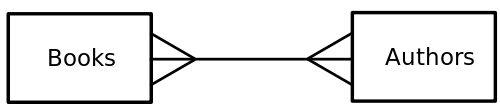
Honeydew does not support defining a **many:many** relationship.
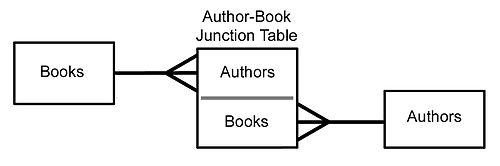
However a many:many relationship is typically implemented by building a connecting table (sometimes called a "junction" or a "bridge" table).
Most many-to-many relationships exist because there is a business many:many relation between logical entities.
For example, a student can enroll in many courses, and a course can have many students. This case is typically solved by a bridge table (e.g., `enrollments`) between `students` and `courses`.
However, some many-to-many relationships are due to **duplicated data**, when the same data is recorded at different grains or times.
A connecting table would not help here: using the data requires deduplicating it to get a single version for each data point.
For more on modeling duplicated data, see [Multi-Grain Tables](/advanced-modeling/multi-grain-tables).
For example authors and books is a many:many relation (authors may write many books, and a book may have multiple authors).
To model it, create a connection table that has as key book id and author id, and connects to both
Metrics and calculations that refer to both can be added on the connection table.
## YAML Schema
Relations are defined in the [entity](/modeling/entities) YAML.
The schema for relation subsection is:
```yaml theme={null}
relations:
- target_entity:
rel_type:
name:
display_name:
description: |-
rel_join_type:
cross_filtering:
connection:
- src_field:
target_field:
- ...
connection_expr:
sql: |-
```
Fields:
* `target_entity`: entity to connect to
* `rel_type`: logical direction of the relationship
* `name` (optional): identifier for the relation. Auto-generated from entity names if not set
(e.g., `orders_to_customers`).
* `display_name` (optional): human-readable label shown in the UI.
* `description` (optional): free-text description of the relation.
* `connection`: a list of fields for a join condition. Must fully cover the primary key of the entity
on the "one" side of the relation.
* `connection_expr`: a custom join expression, if `connection` is not set.
The `sql` expression may only use attributes.
* `rel_join_type` (optional): the type of default join to apply
* `cross_filtering` (optional): the cross-filtering configuration to apply
 Once there is a relationship defined, you can look at data together. For example, you may want to see all the orders of a customer. Honeydew will know how to connect the two.
Relationships control:
* How JOINs are performed between entities
* How filters on entities affect other entities
* How aggregations are performed across entities
Once there is a relationship defined, you can look at data together. For example, you may want to see all the orders of a customer. Honeydew will know how to connect the two.
Relationships control:
* How JOINs are performed between entities
* How filters on entities affect other entities
* How aggregations are performed across entities
 To model it, create a connection table that has as key book id and author id, and connects to both
 Metrics and calculations that refer to both can be added on the connection table.
## YAML Schema
Relations are defined in the [entity](/modeling/entities) YAML.
The schema for relation subsection is:
```yaml theme={null}
relations:
- target_entity:
Metrics and calculations that refer to both can be added on the connection table.
## YAML Schema
Relations are defined in the [entity](/modeling/entities) YAML.
The schema for relation subsection is:
```yaml theme={null}
relations:
- target_entity: